
One place for the whole department.
Your run sheets are in a binder. Your roster's in a spreadsheet. Your training records are in someone's email. Firedesk puts it all in one place.
30-day free trial. No credit card required.
NERIS V1 Data Exchange Compatible
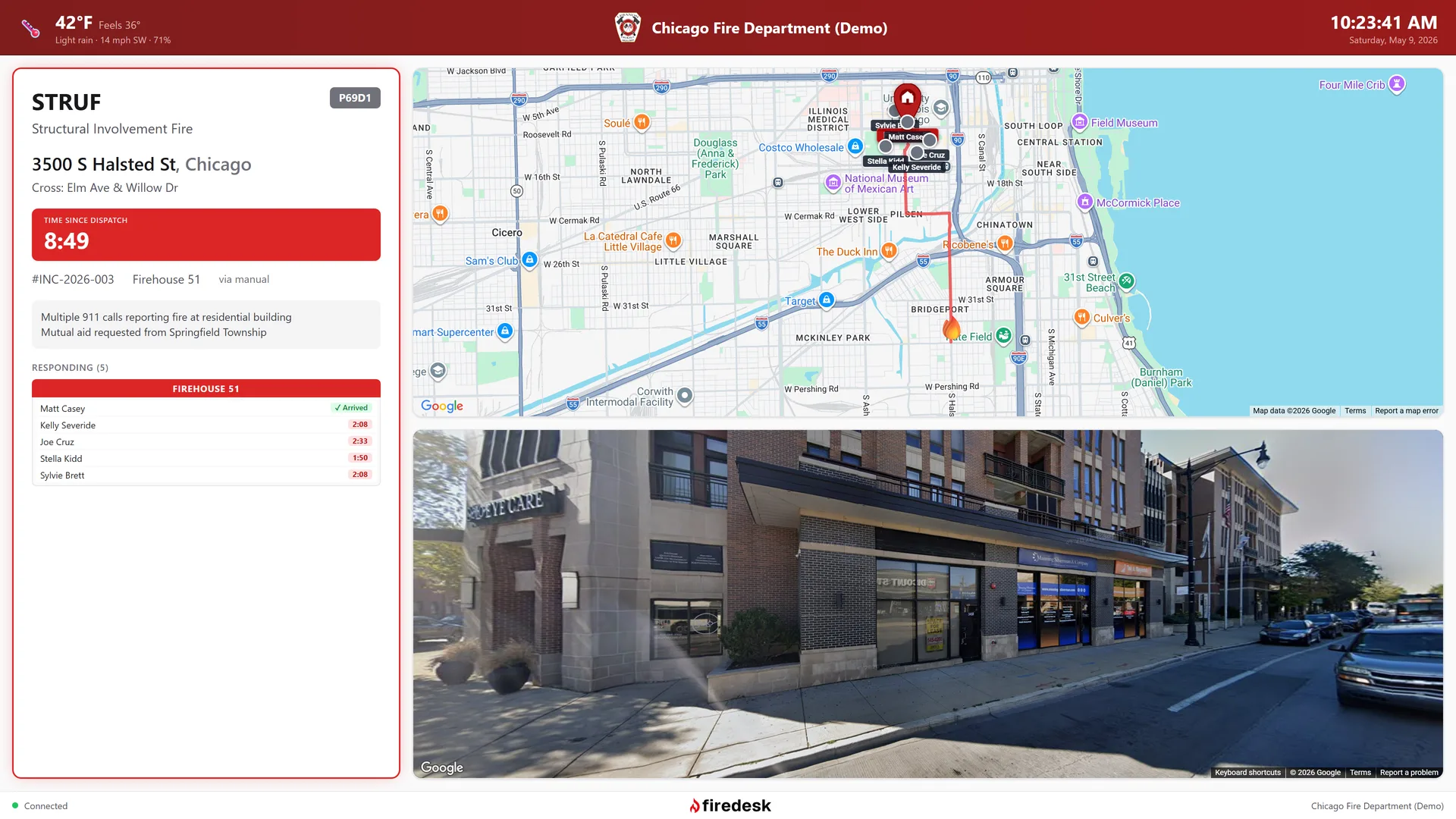
Station display — live incident, responder ETAs, weather
Everything your department needs
One place for the run sheets, the trucks, the roster, and the records — instead of four places that don't talk to each other.
Run the call
From the moment dispatch goes out to the moment the report is filed.
CAD Integration
Active911 and IamResponding connect out of the box, and any other CAD connects through Custom CAD — no code, no waiting on us.
Incident Reporting
NERIS-compliant reporting with all 13 modules. Capture every detail from dispatch to closeout.
Pre-Plans
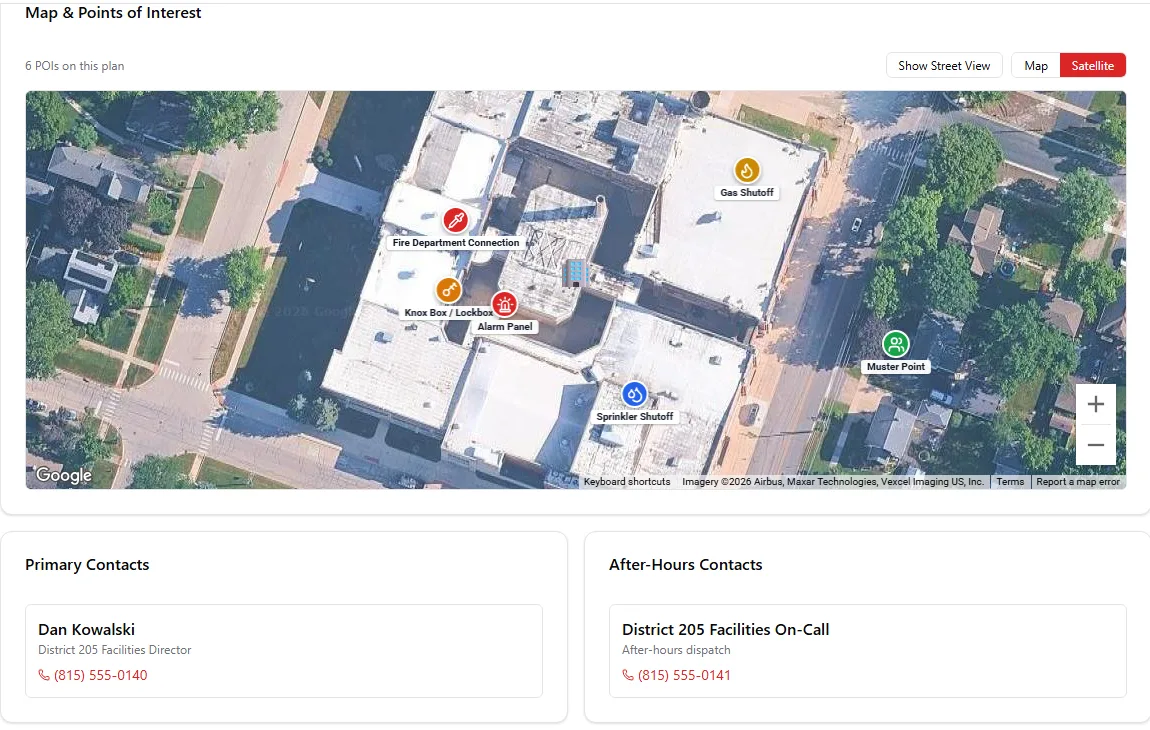
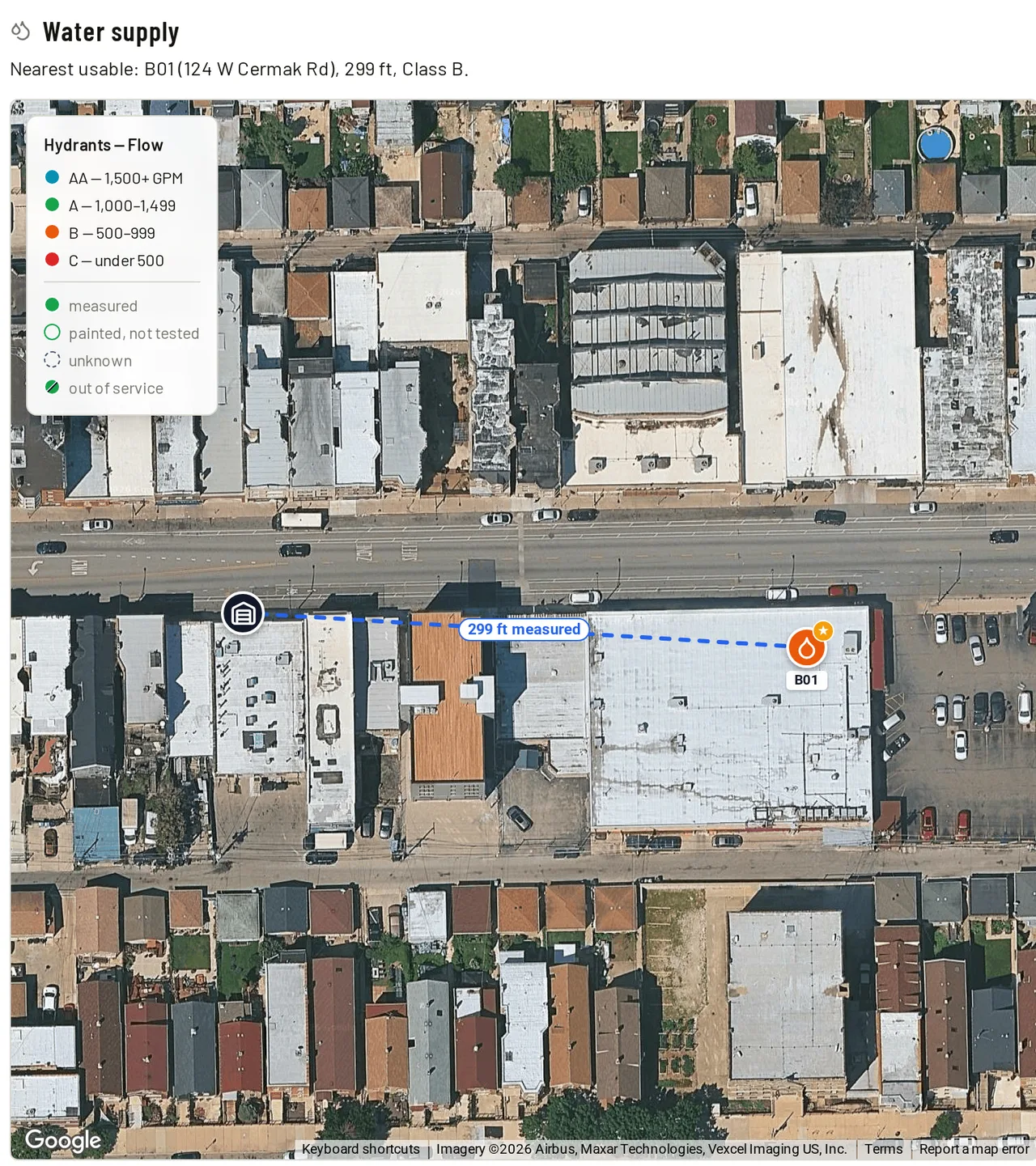
Building pre-plans on satellite maps — hazards, suppression systems, knox boxes, and shutoffs pinned where they actually are, with the hydrants that serve the building drawn from your own hydrant records.
Command View
While the call is running: who's responding, where they are, how far out, and the pre-plan for the address — on every phone in the department.
Know your district
The buildings, the businesses inside them, the water that serves them, and the inspections that keep it current. All of it included — same flat price.
Water Supply & Hydrants
Every hydrant with its main, what it flows, and when it was last tested — the record ISO asks for. Put in the pressures and the pitot readings and you get gallons at 20 PSI and the NFPA 291 color back. A hydrant that's out of service reads that way on the map, on the pre-plan, and on the station TV. Each building gets its needed fire flow, and whether the hydrants around it can deliver it.
Buildings & Occupants
The buildings in your district and the businesses inside them. The unit on Route 4 has had three tenants since 2019 — each one keeps its own history, so when an attorney or the county pulls the file, what you found in that space is still there.
Fire Inspections
See who's due this month, walk the checklist on a phone, and write up what you found. An inspection done late doesn't push the next one back, and a year you missed is recorded as missed instead of quietly disappearing — which is what bites you at the audit. Violations and re-inspections track themselves, and the occupant gets a signed report you print or hand over on the spot.
Community Risk
Every building and business scored Low, Moderate or High on what actually drives it — construction, sprinklers, how many people are inside, how far the water is. It's the same scoring a community risk assessment uses. Crews see the risk on the pre-plan, and the high ones come round for inspection more often.
Keep the trucks ready
Know what's on every rig, what's been checked, and what's about to come due.
Apparatus & Equipment
Track every vehicle, compartment, and piece of equipment. Know what's on each truck at all times.
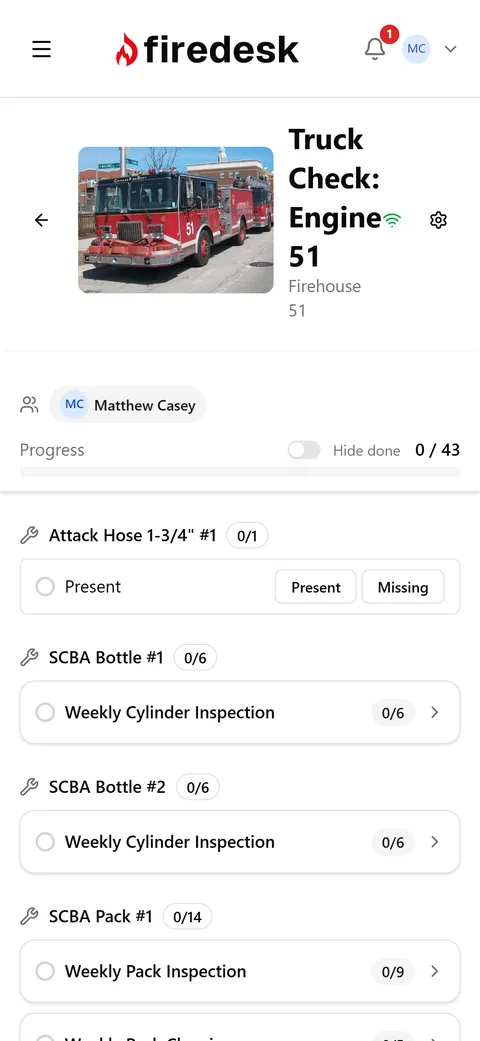
Truck Checks
Digital checklists with real-time sync. Multiple crew members can check the same truck simultaneously.
Compliance Engine
One list for the trucks, the gear, the hydrants, the inspections, the cards and the training hours — and a way to hand a whole zone to the house that covers it in one go.
Station Display
Live incidents on your firehouse TV, with the building's pre-plan across the top — its hazards and the nearest hydrant — before anyone's on the truck. Install on a $30 Fire TV Stick from the Amazon Appstore and pair with a 6-character code.
Keep your people qualified
Hours, certifications, sign-offs, who's covering which shift — and the record of what each of them was exposed to.
Shift Scheduling
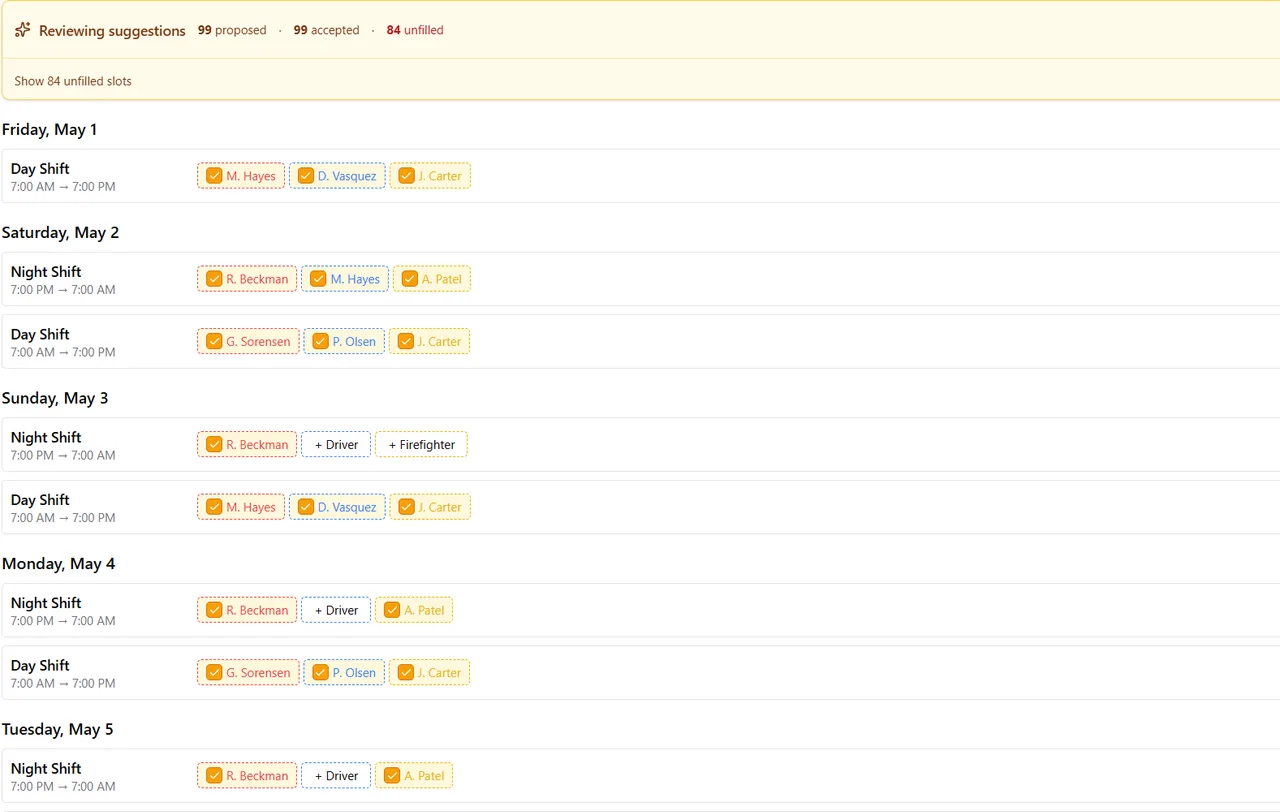
Member availability, qualification-aware auto-fill, and ACA hour cap enforcement. Replace the assistant chief's spreadsheet.
Training & NFPA JPRs
Training hours, certifications, and NFPA JPR sign-offs against the current standards — 1010 (which replaced 1001 and 1002), 1006, 1020, and 470. Members log; officers approve.
Member Management
Roles, permissions, ranks, and specialties. Multi-station support — give every member exactly the access they need.
Calendar & iCal
Department events, training, and shifts in one calendar. Each member subscribes via iCal in Apple, Google, or Outlook.
Personnel Exposures
Every fire call starts an exposure record for everyone on the run reports — what they were in, for how long, the PPE and the decon. Each member can print their own full history, across every department they've served, without asking anyone. The record a cancer presumption claim leans on.
Run the department
The paperwork side — policies, reports, records, and the audit trail underneath it all.
Policies & Procedures
SOPs, SOGs, and department policies — rich text, full-text search across every document, and PDF export with watermarks.
Custom Reports
Build any report you need with a guided builder — charts, tables, and filters. Export to PDF, or schedule it to email itself to the board every month.
Bring Your History
Import years of past incidents from a spreadsheet your old system exported. Preview before it commits, and undo the whole import if it isn't right.
Notifications & Audit Log
Email and in-app alerts for incidents, compliance deadlines, and certification expirations — plus an append-only record of who changed what, and when.
Incident reporting
Every call, captured the way NERIS expects.
All 13 NERIS modules in one workflow — dispatch through closeout. Firedesk checks the report against NERIS before it goes anywhere: if something is missing, you get the exact fields listed, each one a click away from the screen that fixes it. Rejections happen at your desk, not weeks later.
- All 13 NERIS modules — fire, medical, hazmat, and more
- Catch missing fields before you submit, not after a rejection
- Custom report builder for any analytics you need
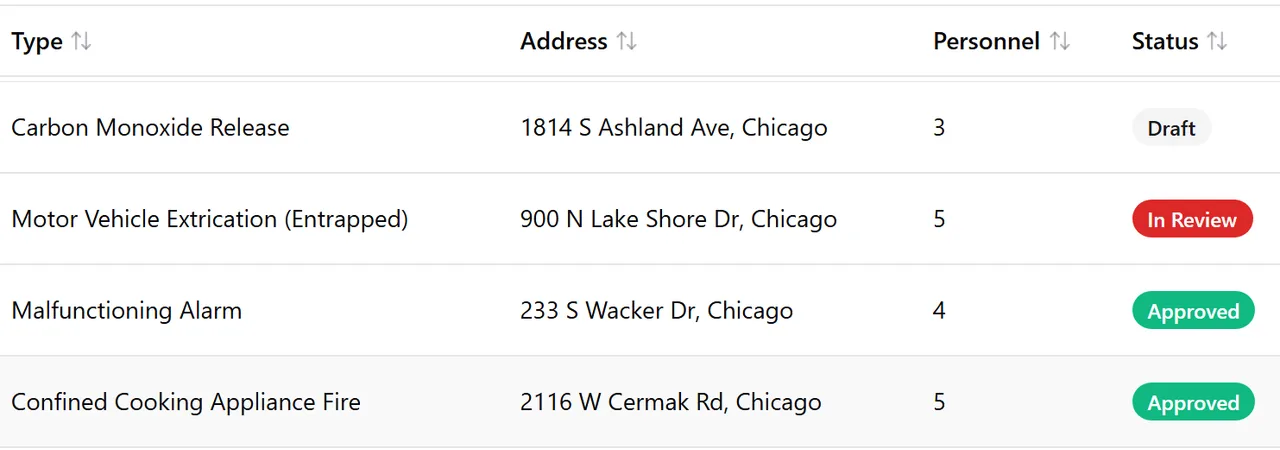
From dispatch to NERIS
Works with your dispatch — whatever you run
Firedesk catches the call before your crew is in the seat. By the time anyone sits down to write the report, the data's already there — straight from dispatch to NERIS, with the narrative being the only thing you actually have to type.
Active911 and IamResponding connect out of the box. Running something else? Every department gets a Custom CAD connection: turn it on in your settings, and Firedesk hands you a web address and a key to give your dispatch center. Nothing to build on our end, nothing to wait for.
- 1
Dispatch arrives
The moment dispatch goes out, your CAD sends the call to Firedesk and the incident is created automatically — no manual entry, no waiting for someone to log it.
- 2
Display lights up
The station-display TV shows the call instantly: address, type, cross streets, dispatch comments, the building's pre-plan, and every responder's status as they roll.
- 3
Report is half-written
Times, responding apparatus, personnel, and the full CAD payload are already on the incident when you open it. The data you've already entered in CAD doesn't need to be re-entered here.
- 4
Add narrative, submit
Write the narrative, fill in any module-specific details, and submit straight to NERIS. The report goes out same-shift, not next week.
Your dispatch provider will want the technical details — send them the CAD webhook contract.
Pre-plans
Walk in already knowing the building.
Map-based pre-plans for the addresses that matter — construction, special hazards, suppression systems, and points of interest pinned on satellite imagery. Crews pull it up en route, and when a call drops at a pre-planned address, the incident surfaces the plan automatically.
- Knox box, FDC, utility shutoffs, and alarm panel marked where they actually are
- Special hazards and occupant notes front and center — before crews make entry
- Primary and after-hours contacts on the plan, one tap to call
- The hydrants that serve the building, from your own registry — the one to use ringed, with the distance to it
- Incidents at a pre-planned address link to the plan automatically
Water supply
Know the water before you need it.
Every hydrant in your district with its main, what it flows, and when it was last tested — the record ISO asks for. Each building knows the hydrant that serves it and how far away it actually is, measured rather than guessed off a straight line, and a hydrant that's out of service reads that way on the map, on the pre-plan and on the station TV.
- Put in the pressures and pitot readings — gallons at 20 PSI and the NFPA 291 color come back
- Confirm which hydrants serve a building; a crew's measured lay never gets overwritten by geometry
- Bag one for repair and it stops counting as water everywhere at once
- Hand a zone to the house that covers it, and the job closes when the inspection is done
Fire inspections
Nothing falls off the schedule.
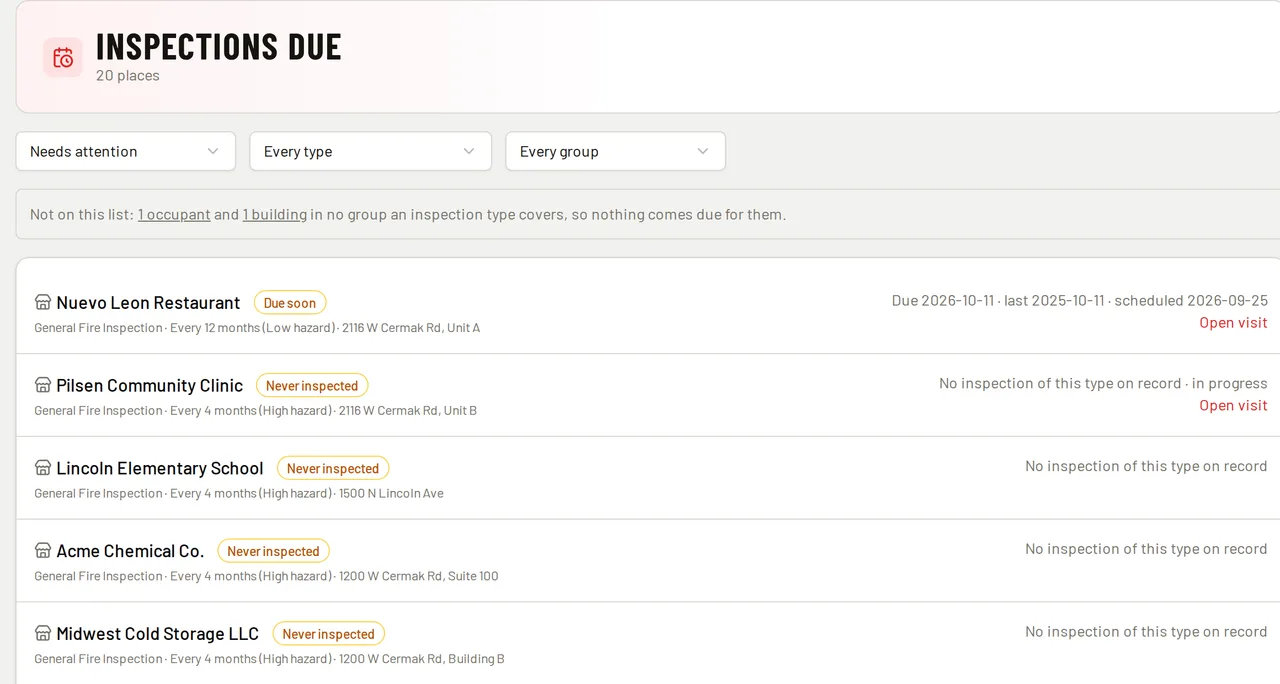
Buildings and the businesses inside them, each on its own inspection cycle. An inspection done late doesn't push the next one back, and a year you missed is recorded as missed instead of quietly disappearing — which is the thing that bites you at the audit. Violations and re-inspections track themselves, and the occupant gets a signed report.
- Group by hazard, occupancy or risk — a place in two groups takes the tighter interval
- Walk the checklist on a phone; what fails becomes a violation with notes and photos
- Places nothing covers are counted and named, so a gap in the program is visible
- Hand a district to an inspector in one action — the visit closes the job
Compliance engine
Know the moment you fall out of compliance.
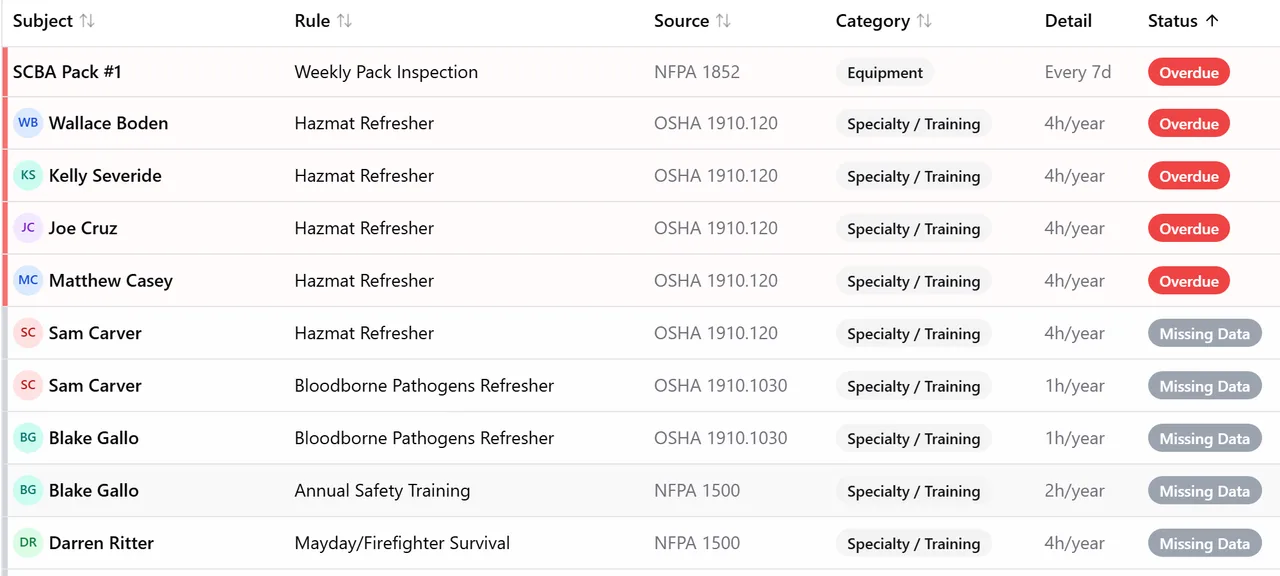
Firedesk checks your apparatus, equipment, hydrants, buildings and members against NFPA-based rules continuously. One page shows what's compliant, what's coming due, and what's already overdue — so nothing expires because it was buried in a spreadsheet nobody opened.
- NFPA-aligned rules seeded and ready — turn on the ones that apply to you
- A tab each for the trucks, the gear, the hydrants, the inspections, the cards and the training — so a thousand hydrants never bury the rest
- Pick a zone and hand it to the house that covers it; the job closes itself once the work is done
- A daily email digest when something changes status — not a firehose
Truck checks
Daily readiness without the clipboard.
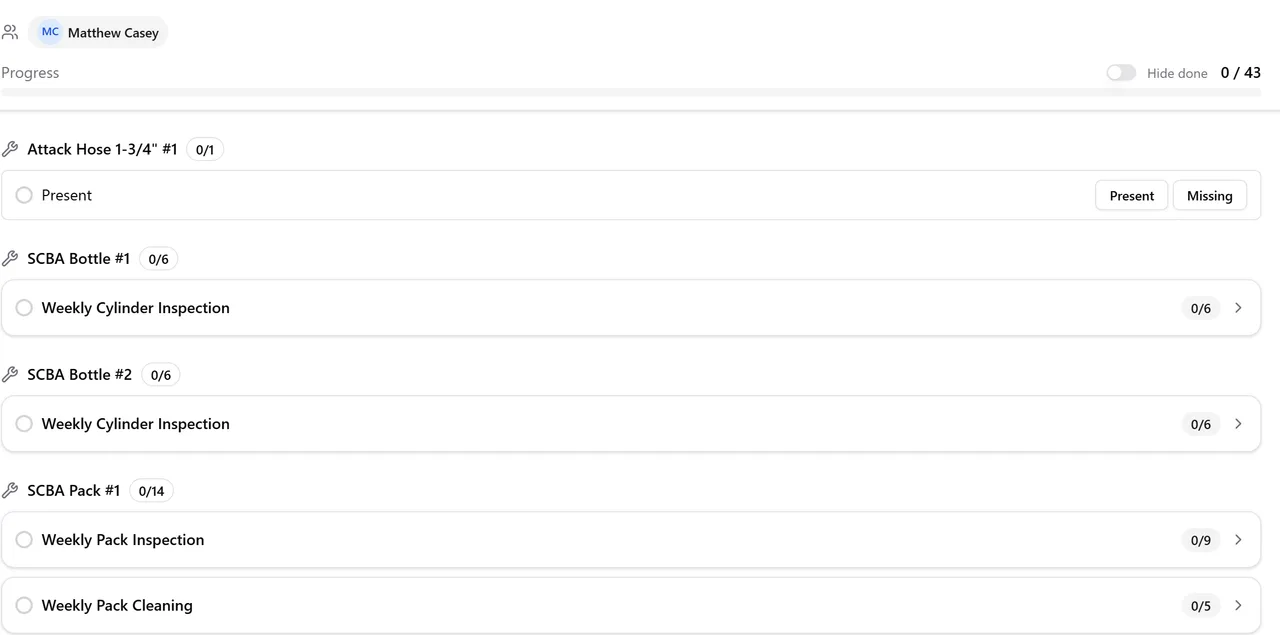
Digital checklists that sync in real time across the apron — on any phone, tablet, or desktop. Multiple crew can check the same truck simultaneously without overwriting each other, and equipment-level results flow directly into compliance and into the equipment's own service history.
- Works on any phone, tablet, or desktop — no app store install
- Multiple crew can split the truck — updates show on each other's screens instantly
- Per-compartment, per-item — findings auto-populate the unit's service log
Shift scheduling
Stop building the schedule by hand.
Members submit availability from their phone. Click Suggest Fills and get a draft that respects rank, specialty, and ACA hour caps. Accept the ones that work, override the rest, publish — and assignments land in each member's calendar.
- One-tap Request Availability — see who's submitted at a glance
- Suggest Fills proposes assignments respecting rank, specialty, and ACA caps
- Accept all, accept one at a time, or override — your call
- Publish notifies every assignee — and members who subscribed once in Apple, Google, or Outlook see new shifts appear on their own calendar
Station display
Mount a $30 Fire TV Stick in the bay.
Firedesk Display is on the Amazon Appstore. Install it on any Fire TV — Stick, Cube, or 4K — pair with a 6-character code from your Firedesk settings, and the live dashboard is on your firehouse TV. Incidents, responder ETAs, weather, the nearest hydrants and the building's pre-plan, without anyone touching a computer.
- Free download from the Amazon Appstore — install once per TV
- Works on every current Fire TV: new Vega-OS Sticks, Fire OS Sticks, Cube, 4K Max
- 6-character pairing code from Settings — no URL or password handling
- Comes back on its own after a power blip on most sticks; reloads nightly to shake off network trouble
No Fire TV? The same display runs in any browser — point a spare laptop or mini PC at the display URL and leave it full screen.
Switching systems
You don't have to start from zero.
Years of run history come with you. Import your past incidents from a spreadsheet, and the reports you run next month cover your whole department's record — not just the calls since you switched.
- 1
Export a spreadsheet
Whatever your current records system gives you. Column names don't need to match ours — Firedesk reads your headers and matches them up for you.
- 2
Check the preview
See exactly what will be created before anything is. Rows that can't be imported are listed with the reason, so you fix the file instead of finding out later.
- 3
Import — and undo if it's wrong
Run it for real. If the result isn't what you expected, revert the whole import in one click and try again.

Alex Tarsha
Founder
Who builds this
Built by someone who runs calls.
I’m a volunteer firefighter in southwestern Illinois and a software architect by trade. I built Firedesk for my own department first, because I was the one filing the run reports and I could see what the paper was costing us.
My chief was losing hours every week to NERIS submissions — hours that belonged on the training ground with the rest of us. That’s how the NERIS integration came to exist. It gave us our chief back.
Firedesk is small on purpose. There’s no call center to route through and no sales team to get past — when you send a message, it reaches the person who wrote the code. I’m still filing run reports at my own department, which is the main reason this keeps getting better.
Simple, transparent pricing
One plan with everything your department needs.
Every feature, however many members you have. No credit card required to start.
Pay monthly, quarterly, or annually — the rate is the same whichever suits your treasurer.
- Unlimited members
- Incident reporting with NERIS submission
- CAD dispatch integration — Active911, IamResponding, or your own CAD
- Import your incident history from your old system
- Apparatus and equipment tracking
- Truck checks with real-time sync
- Shift scheduling with auto-fill
- Training, certifications, and NFPA JPR sign-offs
- Compliance engine (NFPA-aligned)
- Policies & procedures with PDF export
- Station display on Fire TV (Amazon Appstore)
- Department calendar + per-member iCal feed
- Custom report builder
- Real-time notifications & email alerts
- Full audit log
- 1 GB of file storage (photos, attachments, documents)
Questions chiefs ask
The things worth knowing before you spend an afternoon on it.
- Can we bring our old incident records over?
- Yes. Export a spreadsheet from whatever you use now and import it — your column names don't have to match ours. You see a preview of exactly what will be created before anything is, rows that can't be imported are listed with the reason, and if the result isn't right you can undo the whole import in one click.
- Can we bring our hydrants over?
- Yes. Import a spreadsheet — your column names don't have to match ours — and you'll see exactly what would be created or updated before anything is. If your hydrants are already mapped in Active911, Firedesk can pull them straight across instead, and if you're coming off ESO we'll bring your hydrants, mains and flow-test history over for you. Flow tests keep their original readings, so what you've already reported to ISO doesn't change.
- What if our CAD isn't Active911 or IamResponding?
- It still works. Those two connect out of the box, and every department also gets a Custom CAD connection: turn it on in your settings and Firedesk gives you a web address and a key to hand to your dispatch center. There's a published technical contract to send them. Nothing needs building on our end, so there's no waiting list and no integration fee.
- Is this for volunteer departments or career departments?
- Both, and combination departments in particular. The price is flat regardless of how many members you have, so a 60-member volunteer roster costs the same as a 12-person career shift. Availability tracking, shift scheduling, and JPR sign-offs are all built for departments where not everyone is on duty at once.
- How long does it take to set up?
- There's a setup wizard that walks you through stations, apparatus, and members, and you can add people in bulk rather than one at a time. You don't need to import your history or connect your CAD to start using it — plenty of departments begin with truck checks and add the rest over the following weeks.
- What happens when the 30-day trial ends?
- If you subscribe, nothing changes. If you don't, sign-in is disabled until you do — there's no free tier. Your department's data isn't deleted when that happens, and everything is exactly where you left it if you subscribe later. We'll email you before the trial ends, not after.
- Where does our data live, and who can see it?
- On Amazon Web Services in the United States. Each department's records are isolated from every other department's, and within your department you control who sees what through roles and permissions. Every change is written to an append-only audit log showing who did it and when. Our staff only access your account when you ask us to for support.
- If we leave, can we take our data with us?
- Yes — it's your data. Reports and incident listings export to PDF from inside the app at any time. For a complete copy of everything, email us and we'll send it to you; there isn't a one-click full-account export button yet, and we'd rather say so than imply there is.
- Do we have to sit through a demo or talk to sales?
- No. There's no sales team. Start the trial without a credit card and look around on your own — and if you'd rather have someone walk you through it, or you just have a question first, send a message and it reaches the person who built it.
Ready to see your department in one place?
Start your 30-day trial. No credit card, no contract, no sales call.
Start Your Free Trial